
Stern Tech School: Removing the T-Rex Head in Jurassic Park Pinball
Adjusting the T-Rex in Jurassic Park Premium Pinball
The T-Rex in Stern’s Jurassic Park Premium is an incredible interactive feature, but sometimes it may need adjustments to ensure proper movement and ball-catching ability. Follow this guide to understand how it works and how to fine-tune it.
Understanding the T-Rex Mechanism
The T-Rex moves horizontally and vertically using two motors:
Horizontal Movement: Controlled by a stepper motor and a home switch.
Vertical Movement: Controlled by a geared DC motor with three micro switches to define its positions.
Jaw Opening & Ball Catching: Managed by a solenoid and magnet, with an opto sensor to detect when a ball is in the mouth.
Step 1: Access the T-Rex Assembly
Turn off the pinball machine for safety.
Remove the glass and lockdown bar.
Lift the playfield and rest it on the service rails for access to the T-Rex assembly.
Step 2: Adjust Horizontal Movement
If the T-Rex is not moving left or right correctly:
Enter the game’s diagnostic menu:
Navigate to Tests > T-Rex Movement > Horizontal Test.
The T-Rex should move left, right, and center as the stepper motor runs.
If alignment issues occur, check the home switch:
The T-Rex should find the center switch and move an equal number of steps left and right.
If off-center, inspect the stepper motor and cam linkages.
Adjust linkage if needed to ensure proper centering.
Step 3: Adjust Vertical Movement
If the T-Rex does not align properly when catching the ball:
Go to the vertical movement test in the diagnostic menu.
The T-Rex should move through three positions:
Lowest (ball-catching position)
Middle
Highest
If it’s not reaching the correct height:
Loosen the two nuts on the motor plate (located on the back).
Use the U-channel slots to slightly move the motor up or down.
Tighten the nuts and retest until the jaw aligns with the ramp.
Step 4: Adjust the Jaw and Ball-Catching Magnet
If the T-Rex is struggling to catch the ball:
The jaw opens using a solenoid and closes via a spring.
A magnet inside the mouth holds the ball before the jaw closes.
If it’s not catching properly:
Check the opto sensor inside the mouth to ensure the ball is detected.
Manually test the solenoid by pushing the jaw open and ensuring it snaps back correctly.
If necessary, replace a weak solenoid spring to improve closure force.
Step 5: Test and Final Adjustments
Run the diagnostic movement tests again for horizontal, vertical, and jaw movement.
Ensure the T-Rex catches the ball properly by manually rolling a ball up the ramp.
If necessary, repeat minor adjustments to the motor positioning or solenoid components.
Here’s a visual-friendly checklist for quick troubleshooting and adjustments to the T-Rex assembly in Jurassic Park Premium Pinball.
T-Rex Adjustment & Troubleshooting Guide
🛠️ Accessing the T-Rex Assembly
✅ Turn off the machine before starting.
✅ Remove the glass and lockdown bar.
✅ Lift the playfield and rest it on service rails for full access.
🦖 Horizontal Movement Issues (Left & Right)
🔍 Symptoms:
❌ T-Rex doesn't move left/right properly.
❌ Doesn't return to center.
❌ Moves unevenly to the left or right.
✔️ Fix:
✅ Run Horizontal Test:
Menu → Tests > T-Rex Movement > Horizontal
Watch for movement left, right, and center.
✅ Check the Home Switch:The stepper motor moves in set steps.
The T-Rex should always return to the center switch before moving.
✅ Inspect Linkages:Look at the cam mechanism behind the T-Rex.
If it's loose or stuck, tighten or adjust the linkage.
🦖 Vertical Movement Issues (Up & Down)
🔍 Symptoms:
❌ T-Rex doesn't reach the correct height.
❌ Doesn't lower enough to grab the ball.
❌ Moves inconsistently between positions.
✔️ Fix:
✅ Run Vertical Test:
Menu → Tests > T-Rex Movement > Vertical
Watch it move from lowest to middle to highest position.
✅ Check the Three Micro Switches:These switches tell the game when the T-Rex has reached a position.
✅ Adjust Motor Plate Position:Loosen the two nuts on the motor plate (located on the back).
Slide the motor up or down using the U-channel slot.
Tighten the nuts and re-run the test.
🦖 Jaw & Ball Catching Issues
🔍 Symptoms:
❌ T-Rex jaw doesn’t open or close properly.
❌ Fails to catch the ball.
❌ Ball falls out after being grabbed.
✔️ Fix:
✅ Check Solenoid & Spring:
The jaw opens with a solenoid and closes with a spring.
Push the jaw manually—it should snap back closed.
If weak, replace the solenoid spring.
✅ Test the Ball Magnet:Magnet should activate when a ball enters the mouth.
If the ball drops too soon, check wiring & power to the magnet.
✅ Inspect Opto Sensor Inside Jaw:This detects when a ball is inside.
If the game doesn’t register a ball, clean or replace the opto sensor.
🎯 Final Test & Adjustments
✅ Re-run all movement tests (horizontal, vertical, jaw).
✅ Manually roll a ball up the ramp to see if the T-Rex catches it.
✅ If necessary, repeat minor adjustments to the motor plate or solenoid components.
📝 Quick Troubleshooting Guide
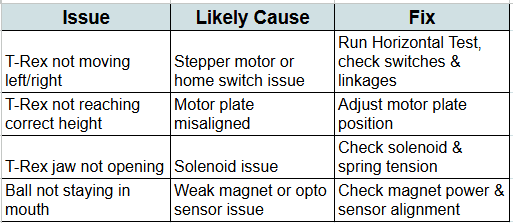
By following these steps, you can fine-tune the T-Rex assembly to move smoothly and properly catch the ball during gameplay. If issues persist, consider checking the motor driver boards or seeking additional help from Stern’s technical support.